
Wake Alarm
The alarm that won't stop until you're really up. Made for keypad flip phones like the LG Exalt VN220. No touch screen needed.
Feedback or ideas? Email vn220apps@mail.tab.bot
- Download the APK (button above).
- Copy it to your phone (USB cable or SD card).
- On the phone, open it in the file manager and press Install. If it asks, allow Unknown sources in Settings → Security.
- Open Wake Alarm, press 0 for Settings and run Test alarm once: it rings in 10 seconds, even with the phone locked.
Updating: copy the new APK over and install it the same way. Your alarms and settings stay.
The package is com.android.cts.wakealarm, an approved prefix on the VN220, so it installs as-is. Don't rename or re-sign it. A phone filter (e.g. Livigent) may need to allow it first.
More details
With a computer instead: adb install -r WakeAlarm-VN220.apk (needs USB debugging on).
Features
More screens
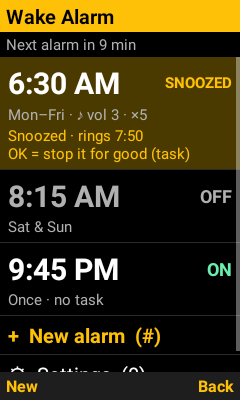
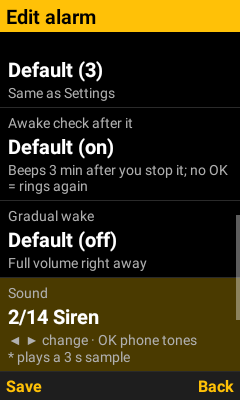
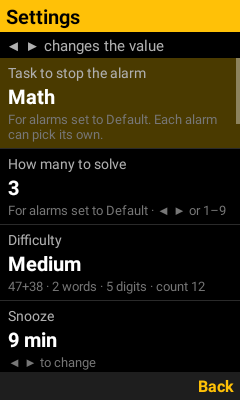
Hear the 14 sounds
14 built-in alarm sounds. Pick one in Settings → Sound (or per alarm on its Sound row) with ◀ ▶, hearing each as you go, or press OK there to use one of the phone's own tones. On the phone they loop until you stop the alarm, at the volume you chose.
| 1. Loud beeps | |
| 2. Siren | |
| 3. Fast ringer | |
| 4. Classic bell | |
| 5. Buzzer | |
| 6. Klaxon | |
| 7. Hi-lo emergency | |
| 8. Whoop | |
| 9. Rising beeps | |
| 10. Digital watch | |
| 11. Pulse | |
| 12. Chirps | |
| 13. Three tones | |
| 14. Morse: WAKE UP |
Keys
Alarm list
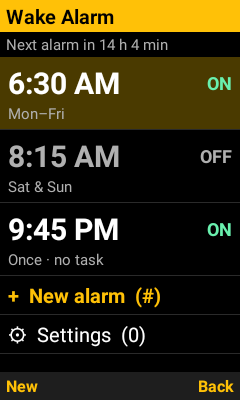
| ▲ ▼ | Move up and down |
| OK | Edit the alarm (or open New alarm / Settings). On a snoozed alarm: stop it for good (takes its task) |
| * or ◀ ▶ | Turn the selected alarm on or off (on a snoozed alarm: off + cancel the snooze, takes its task) |
| # or left softkey | New alarm |
| 0 | Settings |
| Back | Exit (alarms stay set) |
Setting an alarm
| Number keys | Type the time: 0 6 3 0 = 6:30, 1 1 1 5 = 11:15. For hours 2–9 you can skip the 0 (6 3 0 = 6:30). |
| * | Erase a digit while typing. Otherwise, switches AM/PM. |
| ◀ ▶ on the time | One minute earlier / later |
| AM/PM row | OK or ◀ ▶ switches |
| Alarm row | OK turns it ON or OFF |
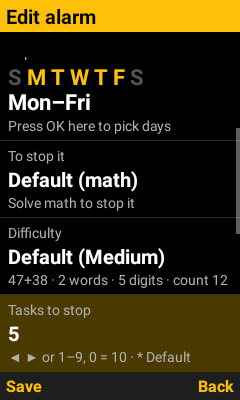
| Repeat row | 1 = Sun … 7 = Sat (press again to remove) · 8 = Mon–Fri · 9 = every day · 0 = just once. Or ◀ ▶ and OK. |
| "To stop it" row | ◀ ▶ or OK: Default (from Settings) · None · Math · Type words · Memory · Count · Random |
| Difficulty row | ◀ ▶ or OK: Default · Easy · Medium · Hard |
| Tasks to stop row | ◀ ▶ or OK, or type 1–9 (0 = 10). *: Default (from Settings) |
| Awake check row | ◀ ▶ or OK: Default · On · Off |
| Gradual wake row | ◀ ▶ or OK: Default · On · Off |
| Sound row | ◀ ▶: Default · the built-in sounds · your phone tone. OK: pick a phone tone. *: play a 3 s sample |
| Volume row | ◀ ▶ or OK, or type 1–7 (8 = Extra high, 0 = Default). *: play a 3 s sample |
| Left softkey, # or Save | Save. It tells you how long until it rings. |
| Back | Saves your changes and goes back |
| Delete alarm | Press OK twice |
| Rings within the hour? | Saving a change to it, or deleting it, opens its task first. Do the task and the change is made; Back or the left softkey cancels. |
When it rings
| No task | OK, # or right softkey stops it |
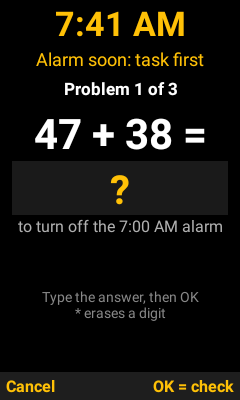
| Math | Type the answer on the number keys, * erases, OK or # checks |
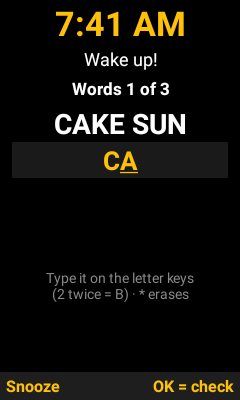
| Type words | Letter keys, old-phone style: 2 = A, 2 2 = B, 2 2 2 = C. Wait a second (or press ▶) to type the next letter on the same key. 0 = space (optional). * erases a letter. OK or # checks. |
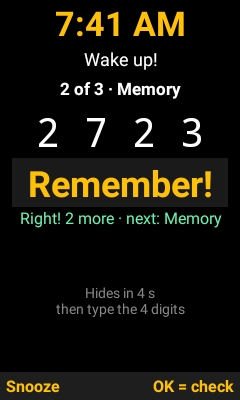
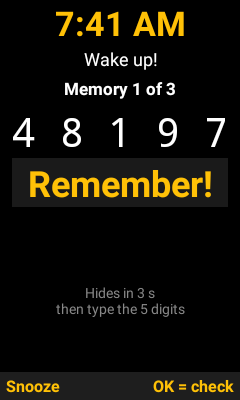
| Memory | Watch the digits; when they hide, type them and press OK. Typing early hides them. |
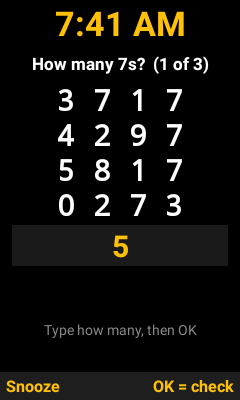
| Count | Count the digit it asks for, type how many, OK. |
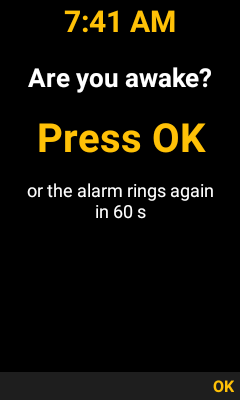
| Awake check | OK, # or right softkey. Nothing else counts. |
| Left softkey | Snooze. Free the first time (you can change this); after that, do one task. Press again to go back. |
| Everything else | Ignored |
Good to know
- The app doesn't need to stay open. Alarms stay set after you exit it and after the phone restarts.
- One-time alarms turn themselves off after they ring. Repeating alarms stay on.
- Phone tones: the first time you pick one it asks to read storage. Press Allow. If a tone can't play, it rings Loud beeps instead; it's never silent.
- If Extra high sounds distorted on your speaker, use 7 of 7 (the phone's normal maximum).
- Closing the flip or pressing End can blank the screen for a moment, but it keeps ringing and turns the screen back on.
- Android can always force-stop or uninstall an app (Settings → Apps). That's the one way out besides the task; nothing can block it.
- Stuck ringing? From a computer:
adb uninstall com.android.cts.wakealarm
Feedback or ideas? Email vn220apps@mail.tab.bot
Version history
- 1.4.1 (Oct 27, 2026): Random is fully random per problem (repeats allowed). Each alarm can set how many tasks stop it. Stopping or turning off a snoozed alarm takes its full task and cancels the snooze. Feedback address in Settings.
- 1.4 (Oct 27): Sound and volume per alarm, with a 3 s preview. Random mixes task types within one alarm.
- 1.3 (Oct 26): Lock near alarm time. Gradual wake.
- 1.2 (Oct 26): Awake check. Memory and Count tasks. Random mode. Difficulty per alarm.
- 1.1 (Oct 26): Works as a regular alarm too. Type words task, free snoozes, stop by itself, 7 volume levels, phone tones fixed.
- 1.0 (Oct 22): First version: math alarm, 14 sounds, Extra high volume.
Updating keeps your alarms and settings: copy the new APK to your phone and install it the same way. New per-alarm options start on Default, so alarms ring as before.
Built by Tab, Oct 2026. Sounds made for this app. Full app source: WakeAlarm-source.zip.
APK SHA-256 2a700d13084192a4f341d0c1e7b7e8f03f510b4102da8c274e19e5a038a8e3ff